How to Order
The online NEXTLIFE project allows anyone to actively take part in preventive care with the assistance of laboratory examinations and modern technology. You can purchase suitable examinations from your home and subsequently visit collection points. Save waiting time at the doctor’s office while avoiding possible contact with infectious diseases.
How Does It Work?
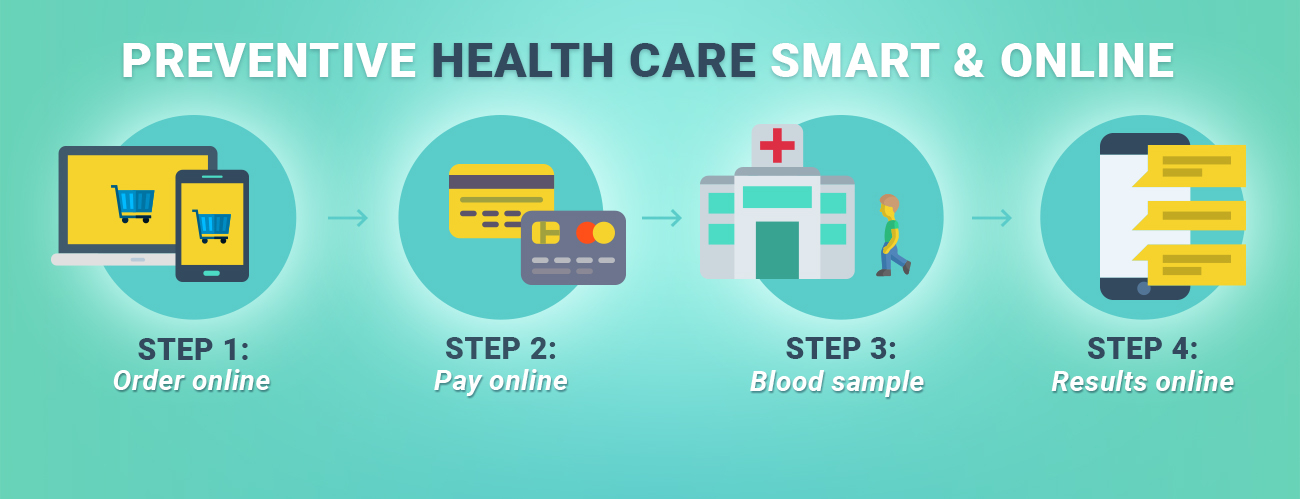
- Choose the most appropriate examination from the menu and purchase it online as in any e-shop. Select the testing site and how you would like to receive your results (by email, post, or the web application for registered users).
- Arrive at the selected blood collection point with your order number and identification documents (ID and insurance card).
- Then, just wait for your results to arrive.
How Do I Order My Package? – Detailed Instructions
What is NEXTLIFE?
NEXTLIFE allows anyone to actively take part in preventive care with the assistance of laboratory examinations and the latest technology.
Choose the most appropriate examination from the menu and purchase it online from the comfort of your own home. After that, just visit the selected blood collection point to give your sample and then you simply wait for your results to arrive. Avoid long waiting times at the doctor’s office and possible contact with infectious diseases.
Why Register?
As a registered user, you can receive your results in the web application and very soon in your mobile app as well, which you can also use to monitor your health over time.
You have the option of sharing your results with other registered users to monitor your family’s health over time.
How to Register?
- In the heading, click on “Register”. Fill in the registration form and click “Register”.
- We will send you an email with a URL address to activate your account.
- Click on the URL address and it opens the page with the sign up data you entered during registration.
- That’s it! Now you can buy your first package and the results will be sent to your app.
The First Order and Selection Process Step-by-Step
The order process is the same as at any e-shop. Find detailed instructions below.
Choose the package you are interested in by clicking “Add into order”. To confirm your selection, click on “I have selected, I WANT TO ORDER”. If you would like to gift the selected examinations to someone else, click “Buy as a VOUCHER”.
You clicked the button “I have selected, I WANT TO ORDER”
- In case of registered users, the form will be pre-entered.
- Select the testing facility, method of payment (by bank transfer / card online / cash payment at a Sazka terminal) and the method of delivering the results (by coded email / post / web application for registered users).
- It is necessary to fill in your personal data, your consent to the terms and conditions, and to the processing of sensitive and personal data. Then choose “Order”.
- Pay by the chosen method.
- We will send a summary of your order and payment confirmation to your email.
- Arrive at the selected testing facility for collection.
- Tell the nurse your order number and provide proof of your identity and your insurance card.
- The nurse takes your samples.
- As information about your health is confidential, you will receive an identification code (PIN) from the nurse for the examination results. Using this PIN, you will be able to open a result file sent electronically. At the same time, this PIN serves for your identification if you contact the NEXTLIFE call centre.
- After collection, it is possible to activate the “HealthBox” section where you can see all your results after examination of samples and their processing with doctors’ comments. We will send you the activation SMS with the code to create your PIN for entry. Activation is needed only for the first order.
- Wait for your results that will arrive during the next few working days.
“Buy as a VOUCHER”
- Fill in your basic contact data, choose the method of payment (by bank transfer / card online / cash payment at Sazka terminal) and the method of delivering results (by coded email / post / web application for registered users).
- If you choose delivery to the application, the recipient must register before using the voucher, otherwise the results will be delivered by coded email.
- Agree to the terms and conditions, order, and pay by the selected method.
- We will send information about your order and its payment to your email. You will also find a URL address, which will provide you the voucher for the recipient.
- The person using this voucher opens the URL address and fills in personal data, chooses the test facility, agrees to the terms and conditions and processing of sensitive and personal data, and clicks on “Personification”.
- The recipient and buyer will receive information about the processing of the order.
- The recipient can now visit the selected testing workplace with his/her order number.
- The person in question gives the order number to the nurse and provides proof of identity and their insurance card.
- The nurse will collect the sample.
- Because information about health is confidential, the recipient receives an identification code (PIN) from the nurse in order to secure the results. Using this PIN, he /she will be able to open the result file sent electronically. At the same time, this PIN serves for his / her identification if he / she contacts the NEXTLIFE call centre.
- Now, simply wait for the results to arrive.
- If the recipient registered and wants to receive the results in the app, it is possible to activate the “HealthBox” section where he / she can see all results after examination of samples and their processing with doctors’ comments. We will send you the activation SMS with the code to create your PIN for entry. Activation is needed only for the first order.
How to Share Results?
In the HealthBox (shown in the profile after its activation and first collection), choose “Sharing results”.
If you want other users to see your results, select “Share results”. Label the sharing and give the sharing code to the person in question. He / she enters it in the HealthBox by clicking on “Accept sharing”. He / she can now see your results in his/ her account.
If you want to accept sharing, enter the code from the person under “Accept sharing”.








 Mobile App
 How it works
 Blood Collection Points